
















Google accounts for 91.54% of the global search engine market which means it’s important to know how your law firm’s website is performing within Google Search results. That is where Google Search Console comes into play.
What is Google Search Console?
Google Search Console is an incredibly useful free tool that allows you to see and understand how your website is performing on Google Search. Search Console also provides information about how Google crawls, indexes, and serves your website within search results, helping you to monitor and find opportunities to optimize your website to perform better within Google search results.
A Step By Step Walkthrough on How to Set Up Google Search Console
The overall process for setting up and verifying your law firm’s website on Google Search Console is relatively simple. Let’s walk through the steps now.
In order to start the process you’ll want to head over to Google Search Console. After hitting start now, you’ll be prompted to sign into the Google account that you would like to be associated with the profile. From there, if this is the first time you are using Search Console, you’ll be prompted with the option to pick which type of property you’d like to create:
- Domain Property – Includes all URLs and subdomains.
- For example, if you owned the domain “www.yoursite.com” but also “yourwebsite.com” without the www. in front, you’d want to set up the domain property so you can track all the traffic across your main domain as well as any subdomains you may have.
- URL Prefix Property – Includes only URLs with the specified prefix that you input. This option makes the most sense if you want to view data for only a specific section of your site.
- For example, if you only want to see data on your practice area pages you could input the URL: www.yoursite.com/practice-areas/
We often recommend that a law firm set up Search Console using the domain property so you don’t miss any relevant data– you can always filter the data to look at specific pages or sections of your website if you want to later on.
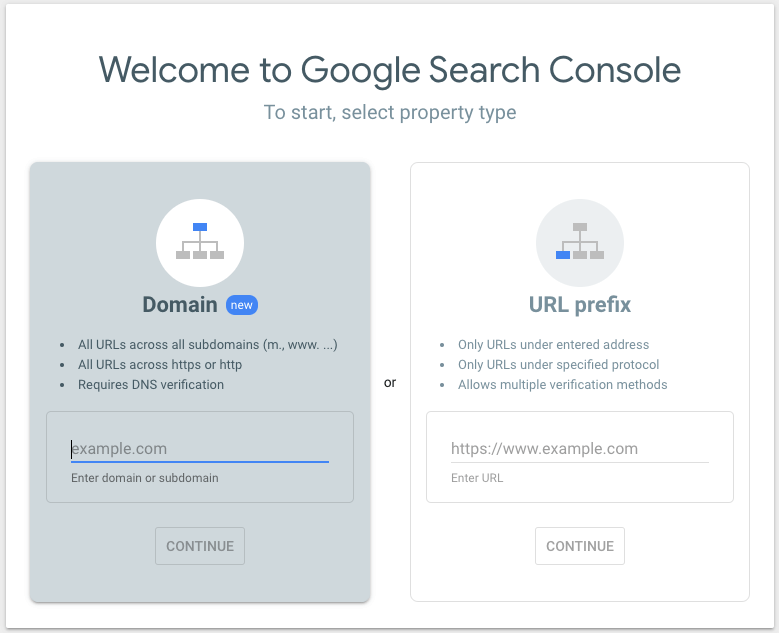
Once you decide which property type you would like to set up, the next step is to verify the property.
Verifying a Domain Property
Should you choose the recommended path of setting up a domain property, you’ll need to go through some steps to verify the property and start seeing your data flow. Once you input your domain and hit continue you’ll be presented with the following:
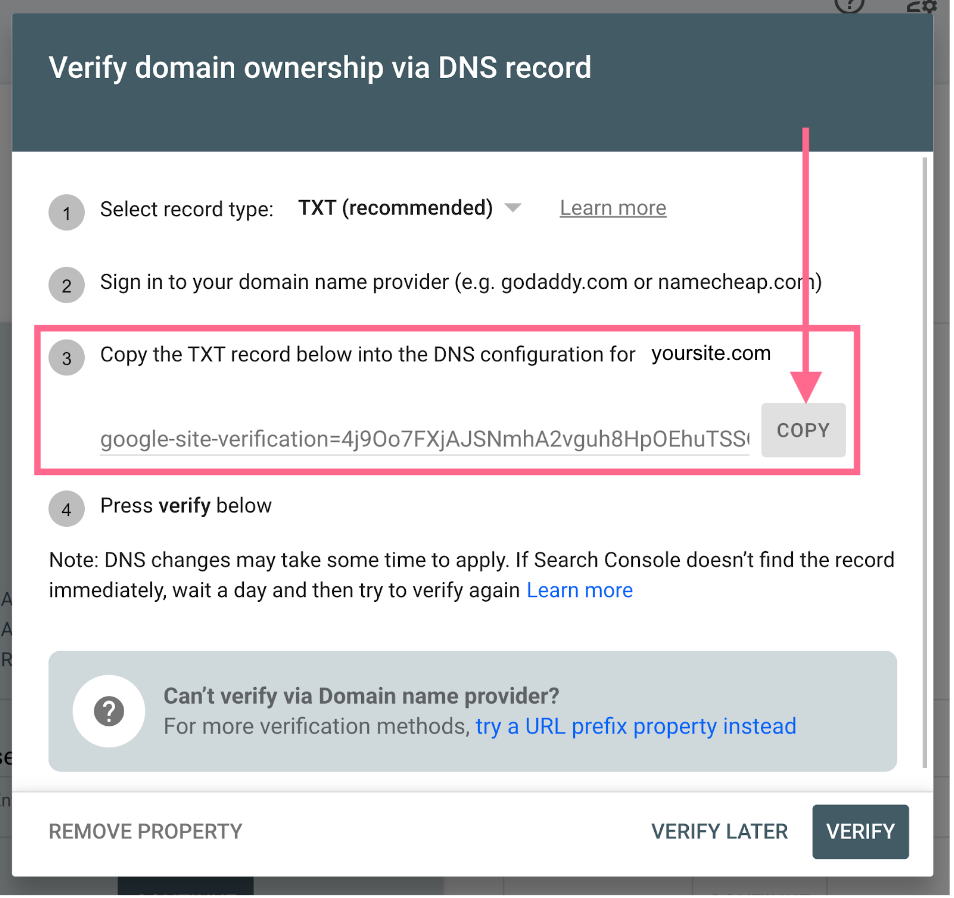
This is where you will need to access your DNS. If you are unsure of how to do this, your website developer should be able to assist you. Once you’re logged into your DNS, you’ll want to copy and paste the TXT record and add it to your DNS configuration. Once you’ve done that, you are ready to hit ‘Verify’. If it does not work right away, it’s important to note that DNS changes may take some time to apply– so if it does not work the first time, try again in a few hours or even the next day and the verification should work.
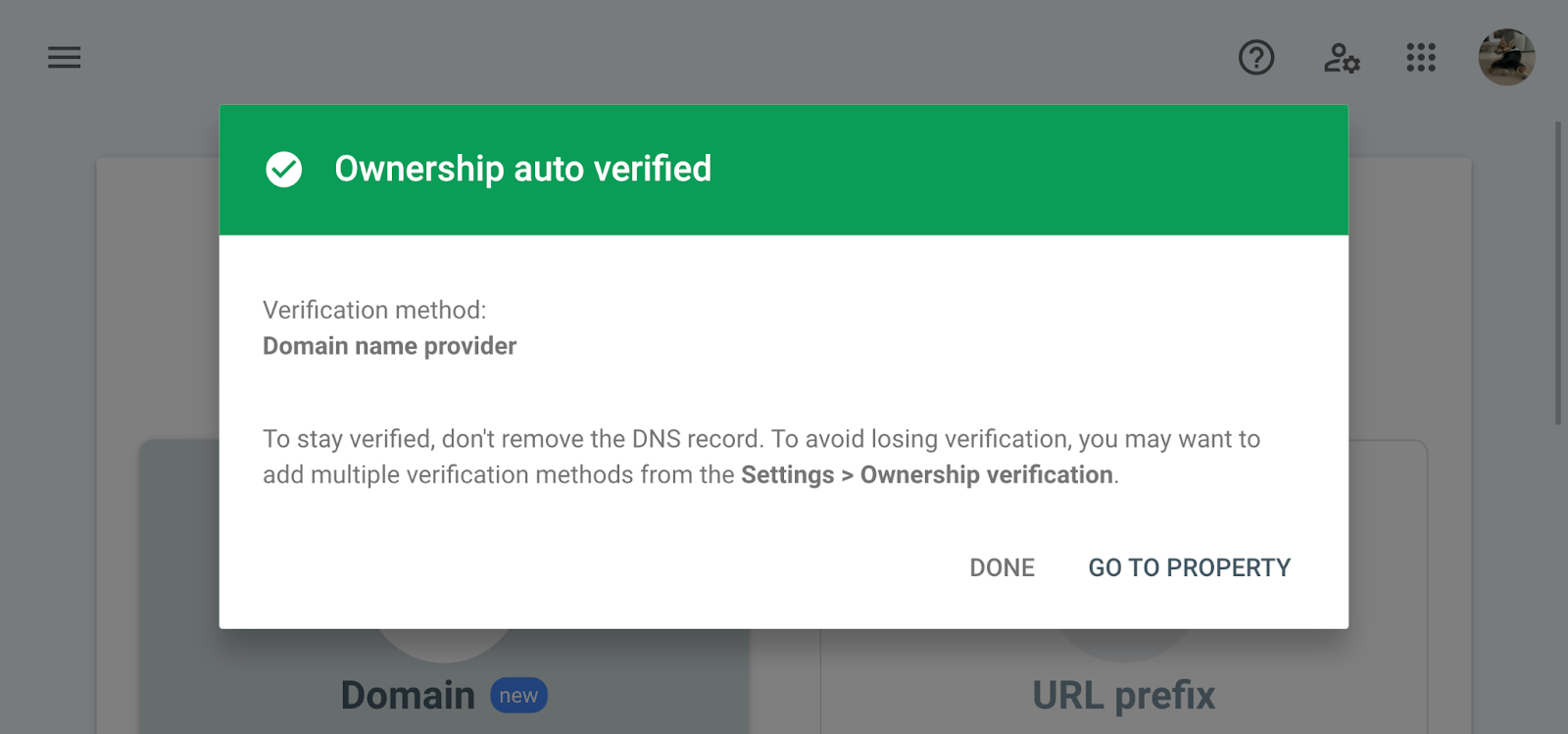
Once you’ve successfully verified the property you should get a pop-up notification that looks like this:
Verifying a URL Prefix Property
If you decide to choose the URL prefix property, you will still need to verify the property– however, the steps are slightly different. After you input the URL you’d like to set up the property for and hit ‘Continue,’ you’ll be prompted to verify your ownership. In contrast to setting up a domain property, this time you will have a few different options.

From here, you can choose the verification method that is easiest for you and follow the instructions Google Search Console provides. Once you are finished hit ‘Verify’ and then you should be all set. Similar to if you were setting up the domain property, it may take some time for the changes to be reflected so if your ownership is not verified immediately, do not panic.
Receive Help Understanding Your Google Search Console Data
If you are having trouble getting your law firm’s website set up on Google Search Console or you just want a better understanding of how to interpret your data, reach out! Our expert team of digital marketing professionals use Google Search Console day in and day out and are more than happy to provide advice on how to get the ball rolling and use the data to your advantage.
Finally, if you set up your Search Console and are unhappy with the results, then it may be time to invest in SEO for your law firm and have no fear– our team at 9Sail can help you out with that as well. Get the conversation started and see how SEO can benefit your law firm.
Helpful resources
Discover the power of effective digital marketing.
Sign up to receive 9Sail’s exclusive content and tactical tips, focused on helping law firms grow.
9Sail takes your privacy seriously and will only use your personal information to deliver communications you have requested of us. You can change your preferences at any time.